
The Eureka LMS is no longer available
You have been redirected to this page because the Eureka Learning Management System is no longer available.
All online courses and work instructions have been moved to the Harvard Training Portal. Please update any bookmarks you have for Eureka to https://trainingportal.harvard.edu. To download a complete list of Eureka application, work instructions, and course URLs, click here.
Key Points about Making the Transition from Eureka to the Harvard Training Portal
1) Online Courses
- All Eureka online courses are available in the Harvard Training Portal’s course catalog. You can search by the Eureka course titles or use the systems browse feature to find courses either by topic or by training organization.
- All of your relevant training history – courses you completed in Eureka – have been migrated to the Harvard Training Portal and can be viewed in the ME page.
2) Eureka Work Instructions
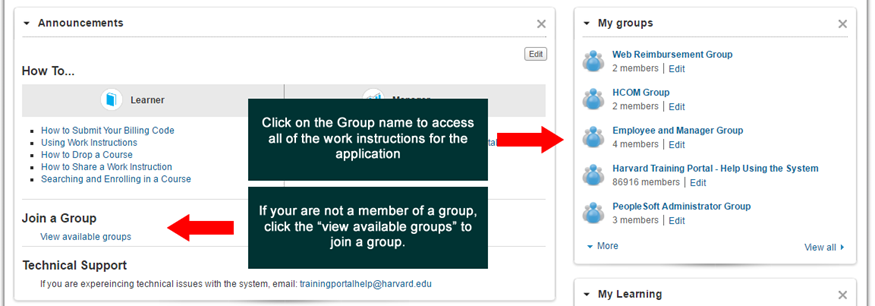
All Eureka work instructions have been moved to Groups. Member of groups have been assigned based users’ current system roles. Groups you belong to will appear on the right side of your home page within the My Groups panel. If you are missing from a group you should belong to, click that appears under the Join A Group header.
3) Finding Work Instructions
- From the homepage you can do a search for any work instruction and the system will return all the instructions relative to the groups you belong to. You can also click on the Group name and do a search from within the group to see only instruction relative to that application.
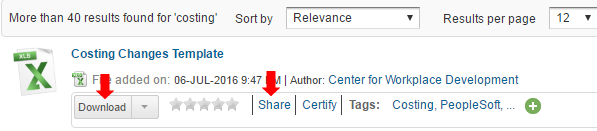
- When the system returns the search results, always click the download button (instead of the document title link) to quickly open the document you want to view.
Documents can also be “shared” with another person by clicking the Share link and selecting the name of the person. The system will general an e-mail with a link to the work instruction.
Please look for more help information on the Harvard Training Portal’s homepage.